前言
之前导师让我去给工作站安装上anomalib环境来进行缺陷检测,于是乎就在这里写下我安装Anomalib环境的记录,说不定以后还有再安装一次呢~,
注意,强烈建议先读完本文再进行安装!!!!!!!
需要的资料
https://github.com/openvinotoolkit/anomalib 这个是Anomalib的官方的地址
安装过程
(备注,使用镜像源-i https://pypi.tuna.tsinghua.edu.cn/simple 这个算是基本操作了,下面需要的库如果pip下载网速慢给pip指令加上这个参数 )
安装前请检查电脑中的CUDA以及NVCC的软件包(如果是使用NVIDIA的显卡来进行计算的话) ,看看NVCC是否成功安装以及集成到虚拟环境之中(如果使用了python虚拟环境的话),如果这两个东西没有配置好,后续的机器学习可能是CPU硬算的
关于NVCC我后面有时间将这个写成博文再发出来
刚刚安装好上述环境完成后最好重启下电脑,不然有的虚拟环境可能不认,(当然,最好也手动将CUDA扔到环境变量中)
下面是官方给的安装命令
pip install anomalib

# Get help for the installation arguments 备注:查看安装参数
anomalib install -h

# Install the full package 备注;完整安装
anomalib install

# Install with verbose output 备注:安装并输出详细信息
anomalib install -v

# Install the core package option only to train and evaluate models via Torch and Lightning
anomalib install --option core 备注:只安装核心可选包

# Install with OpenVINO option only. This is useful for edge deployment as the wheel size is smaller.
anomalib install --option openvino 备注:只安装OPENVION(更方便再边缘计算点中使用)
这里有一个坑,上面要安装torch 会自动安装torch,但是自动安装的torch有一个问题,安装的torch无法使用CUDA,所以我个人强烈建议,要提前先安装好torch!一定要选好你系统匹配的torch。
我简单提下安装torch的方法。torch官网:https://pytorch.org/
前往官网,如下图,选中你系统对应的环境,然后会出现一个安装命令,复制这个安装命令到电脑上(要与anomalib在一个虚拟环境之中哦)进行安装,再次说明
使用pip直接用镜像源安装的版本是无法使用cuda的!
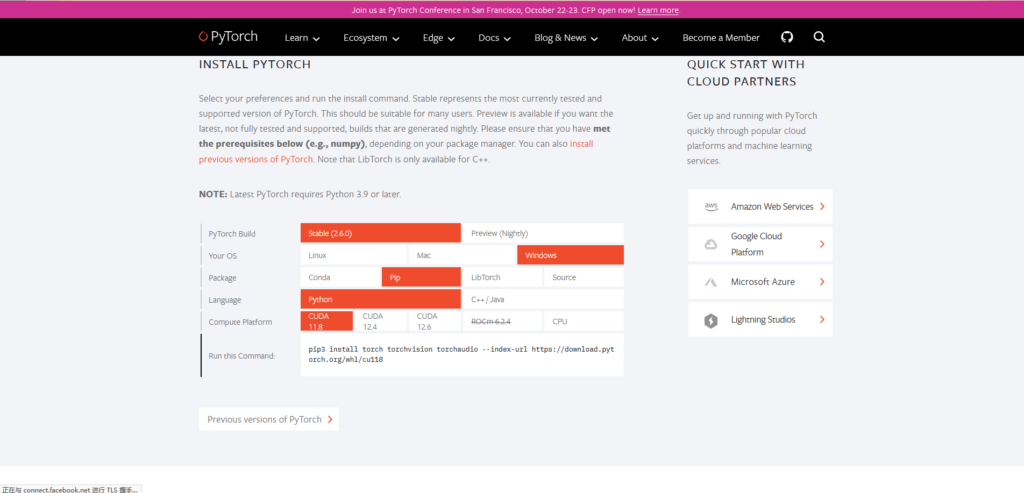
我这边工作站使用的安装命令如下(NVIDIA A6000)
pip3 install torch torchvision torchaudio --index-url https://download.pytorch.org/whl/cu124接下来安装过程中可能会出现类似下面的报错:
ERROR: pip's dependency resolver does not currently take into account all the packages that are installed. This behaviour is the source of the following dependency conflicts.
huggingface-hub 0.25.2 requires requests, which is not installed.
huggingface-hub 0.25.2 requires tqdm>=4.42.1, which is not installed.
imgaug 0.4.0 requires matplotlib, which is not installed.
imgaug 0.4.0 requires Shapely, which is not installed.
imgaug 0.4.0 requires six, which is not installed.
lightning 2.4.0 requires torchmetrics<3.0,>=0.7.0, which is not installed.
lightning 2.4.0 requires tqdm<6.0,>=4.57.0, which is not installed.
open-clip-torch 2.26.1 requires tqdm, which is not installed.
pandas 2.2.3 requires python-dateutil>=2.8.2, which is not installed.
pandas 2.2.3 requires tzdata>=2022.7, which is not installed.
pytorch-lightning 2.4.0 requires torchmetrics>=0.7.0, which is not installed.
pytorch-lightning 2.4.0 requires tqdm>=4.57.0, which is not installed.
scikit-image 0.24.0 requires tifffile>=2022.8.12, which is not installed.
Successfully installed MarkupSafe-2.1.5 filelock-3.13.1 fsspec-2024.2.0 jinja2-3.1.3 mpmath-1.3.0 networkx-3.2.1 numpy-1.26.3 pillow-10.2.0 sympy-1.13.1 torch-2.4.1+cu124 torchaudio-2.4.1+cu124
这种报错记得补充完整依赖就行了(要补充的依赖有点点多)
但是下面我要提到些依赖,他们的pip命令是有些不一样的
注意,库’dotenv’应该安装为pip install -U python-dotenv
注意,库“sklearn”应该安装为scikit-learn
容易碰到的问题
容易碰到的几个坑:
⠴ Installing packages...  This may take a few minutes.
  error: subprocess-exited-with-error

  × python setup.py egg_info did not run successfully.
  │ exit code: 1
  ╰─> [6 lines of output]
      Traceback (most recent call last):
        File "<string>", line 2, in <module>
        File "<pip-setuptools-caller>", line 34, in <module>
        File "C:\Users\admin\AppData\Local\Temp\pip-install-ugducsbi\pathtools_23d2ac0d2b09446eaf3332740c739cf4\setup.py", line 25, in <module>
          import imp
      ModuleNotFoundError: No module named 'imp'
      [end of output]
这个imp库。因为 imp 模块在 Python 3.4 之后被弃用并在 Python 3.12 中被移除。
尝试换用python3.11
Traceback (most recent call last):
  File "C:\Users\admin\.conda\envs\q2019_anomalib_2\Scripts\pip-script.py", line 6, in <module>
    from pip._internal.cli.main import main
  File "C:\Users\admin\.conda\envs\q2019_anomalib_2\Lib\site-packages\pip\_internal\cli\main.py", line 10, in <module>
    from pip._internal.cli.autocompletion import autocomplete
  File "C:\Users\admin\.conda\envs\q2019_anomalib_2\Lib\site-packages\pip\_internal\cli\autocompletion.py", line 10, in <module>
    from pip._internal.cli.main_parser import create_main_parser
  File "C:\Users\admin\.conda\envs\q2019_anomalib_2\Lib\site-packages\pip\_internal\cli\main_parser.py", line 9, in <module>
    from pip._internal.build_env import get_runnable_pip
  File "C:\Users\admin\.conda\envs\q2019_anomalib_2\Lib\site-packages\pip\_internal\build_env.py", line 15, in <module>
    from pip._vendor.packaging.requirements import Requirement
  File "C:\Users\admin\.conda\envs\q2019_anomalib_2\Lib\site-packages\pip\_vendor\packaging\__init__.py", line 5, in <module>
    from .__about__ import (
ModuleNotFoundError: No module named 'pip._vendor.packaging.__about__'
这个不知道为什么CONDA中的python3.11中的PIP有问题,上面的报错是由于python 3.11导致的
所以最后换用了python 3.9
在anomalib install -h这个命令执行过程中报
OpenVINO is not installed. Please install OpenVINO to use OpenVINOInferencer.
OpenVINO is not installed. Please install OpenVINO to use OpenVINOInferencer.
To use wandb logger install it using `pip install wandb`
usage: anomalib [-h] [-c CONFIG] [--print_config[=flags]] {fit,validate,test,predict,tune} ...
error: argument subcommand: invalid choice: 'install' (choose from 'fit', 'validate', 'test', 'predict', 'tune')
解决方案:pip install openvino-dev(这个是一个完整版本)
然后安装完成,开始使用吧~